


When an unknown number interrupts my day, I want an answer quickly: is this a person I know, a business call I need, or another nuisance that can wait? TrustDial is built around that simple decision. It is a free communication app from Oregon Coast App LLC that brings caller identification, spam blocking, and message organization into one place. After using it as a practical phone companion, I found its biggest value is not a dramatic change to calling; it is the way it can reduce small interruptions when I use it with a consistent routine.
The app is aimed at everyday phone users rather than people looking for a full replacement for their dialer or messaging service. Its store summary focuses on identifying callers, blocking spam, and keeping messages organized, and that is the right way to understand it. TrustDial works best as a layer around the calls and texts I already receive. It helps me decide what deserves attention, but it does not remove the need for judgment.
How I use TrustDial in a normal day
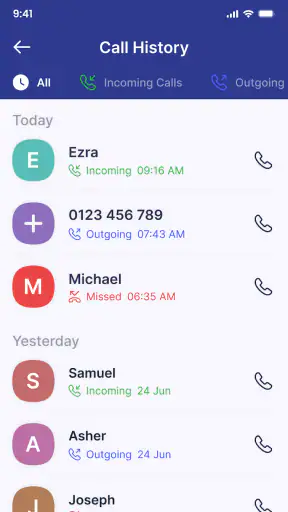
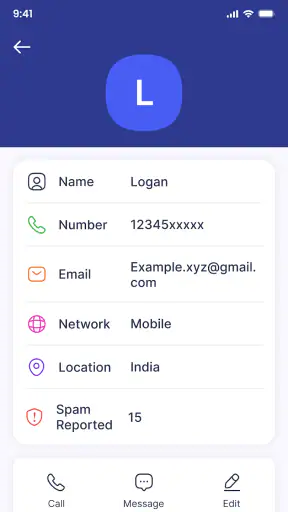
My baseline workflow starts with the caller screen. When a number I do not recognize appears, I use the identification information as a first clue instead of answering automatically. That small pause is useful during work, shopping, or family time, especially when repeated unknown calls make it difficult to tell a genuine contact from a sales pitch. If the call looks suspicious or clearly unwanted, blocking it immediately keeps the same interruption from becoming a recurring problem.
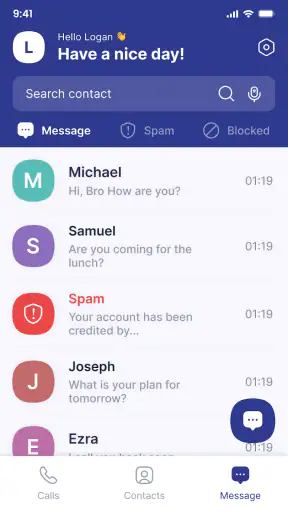
I also treat messages as a separate part of the routine. A phone can become difficult to manage when useful conversations sit beside promotional texts and unwanted messages. TrustDial’s organization focus makes more sense when I review messages in batches rather than reacting to every notification. I can deal with personal replies first, inspect unfamiliar senders later, and avoid letting a crowded inbox dictate my attention throughout the day.
A realistic example is a delivery day. I may be expecting a call from a courier, but the number may not be saved in my contacts. I would rather see whether the caller appears identifiable than reject every unfamiliar number. If another number keeps calling without leaving a useful message, blocking it prevents the same pattern from taking over the afternoon. This is where the app feels practical: it supports a decision process instead of asking me to trust every unknown call or reject all of them.
The most important habit is to avoid treating identification as proof. A recognized label can help me prioritize, but I still avoid sharing codes, payment details, or personal information during an unexpected call. TrustDial can make screening faster; it cannot replace common sense. That distinction matters because a caller can sound convincing even when the phone number looks familiar.
What the first setup is really for
During initial use, I would focus on the parts that affect daily decisions rather than trying to change everything at once. I check how caller information appears, how blocking is handled, and where message organization fits into my existing phone habits. The goal is a calm workflow: identify first, decide second, and only then answer, ignore, or block.
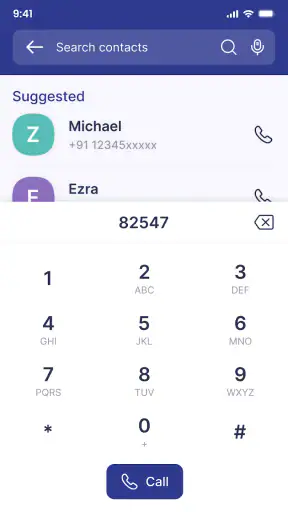
I also recommend keeping important contacts saved with clear names. Caller identification is most useful for numbers outside my address book, but a well-maintained contact list still gives me the fastest and most reliable context. TrustDial works alongside that foundation rather than replacing it. If my contacts are messy, no caller utility can completely solve the confusion.
The app is free and has an Everyone content rating, which makes it easy to consider for a shared family phone or for someone who wants a straightforward communication aid. It supports devices running Android 8.0 or later. On an older phone that still meets that requirement, I would pay attention to how comfortably the app fits the device’s normal call and message habits before making it part of the household routine.
Settings I would check before relying on it
Settings deserve more attention than they usually receive in a caller-blocking app. I would first review which kinds of calls should be treated as suspicious and which should remain available for manual decisions. Aggressive blocking may reduce interruptions, but it can also create friction when a school, clinic, delivery service, or local business calls from a number I have not saved.
For that reason, I prefer a staged approach. At first, I would observe how TrustDial identifies unfamiliar callers and use blocking selectively. After seeing which unwanted numbers return repeatedly, I would make the blocking routine more decisive. This creates a useful balance between protection and availability, especially for people who are waiting for an important call from an unfamiliar number.
Message organization also benefits from a deliberate review. I would look through the categories or presentation available in the app and confirm that conversations I care about remain easy to find. A tidy inbox is only helpful if it does not hide a message I need. When I use a communication filter, I want it to reduce noise without making me check several places for every reply.
Another setting-related habit is to examine the app after changing my normal phone behavior. If I begin using a new messaging application, switch devices, or save a large group of contacts, I would revisit the way TrustDial fits into that setup. Communication tools are most reliable when their rules match the way I actually use the phone, not the way I expected to use it during installation.
Privacy is also part of my settings checklist, even when the app’s main purpose is convenience. Caller identification and message management involve sensitive communication, so I would read the permission prompts and privacy choices carefully before enabling anything. I would not grant access casually, and I would explain the purpose to another family member before installing it on a shared device. That is not a criticism unique to TrustDial; it is the sensible trade-off for any tool that helps interpret calls and messages.
Shortcuts and repeatable patterns that save time
The fastest way to benefit from TrustDial is to create repeatable decisions. I use three broad responses to an unfamiliar contact: answer when I am expecting something, ignore when the timing is wrong but the call may matter, and block when the pattern is clearly unwanted. Keeping those choices consistent prevents me from reconsidering the same situation every time the phone rings.
I also find it useful to review missed calls at a fixed point instead of opening each notification immediately. This is especially helpful when I am working or commuting. A quick batch review lets me compare the caller information, check whether a voicemail or message adds context, and decide what deserves a callback. The advantage is not just fewer interruptions; it is better decisions because I am looking at the whole pattern.
For messages, I would separate urgent communication from routine cleanup. I answer people I know first, then inspect unfamiliar or unwanted senders, and finally block or organize anything that keeps returning. This order prevents spam handling from consuming the time I should spend on actual conversations. It also makes the app feel less like another inbox and more like a filter that supports my priorities.
One less obvious use case is temporary contact management. If I am dealing with a short-term service provider, event organizer, or marketplace seller, I may not want to save every number permanently. TrustDial can help me recognize and manage the conversation while I decide whether that contact belongs in my address book. The trade-off is that temporary contacts are harder to identify later if I remove them too quickly, so I would keep a note of any number connected to an unfinished transaction.
Another useful pattern is learning from repetition. A single unfamiliar call is ambiguous. Several calls at similar times, with no meaningful message and no connection to anything I am expecting, provide stronger evidence that blocking is sensible. I would not block based on one missed call from an unknown number if I am waiting for a medical office or a repair technician. TrustDial becomes more useful when I combine its identification with the context of my week.
For older relatives, I would keep the routine even simpler. I would show them how to inspect an unfamiliar caller, how to avoid giving information during an unexpected call, and how to block a number that repeatedly causes trouble. The app can support that lesson, but the real benefit comes from a clear household rule: when uncertain, do not rush. Ask another family member or call the organization back using a trusted number.
Where the app is strong, and where I would be cautious
TrustDial’s strongest quality is its focus. It addresses three connected problems—unknown callers, unwanted calls, and message clutter—without asking me to replace every communication tool on the phone. That makes it appealing if my main frustration is interruption rather than a lack of calling features. I can keep my normal contacts and conversations while using the app to bring more structure to the edges of them.
Its audience is also reflected in its reach: the app has passed five million installs and carries an average rating of 4.3 from around ten thousand ratings. Those figures suggest that many people find the general idea useful, but they do not guarantee that every identification or blocking decision will match my situation. I still judge the app by how well it handles the numbers I actually encounter.
The current version is 3.4, and the app was released on January 3, 2025. That relatively recent starting point makes me more attentive to practical fit than to long-term assumptions. I would keep it updated through the normal app store process and check its behavior after updates, particularly if caller presentation or message organization changes in a way that affects my routine.
The main limitation is the unavoidable uncertainty around unfamiliar communication. No caller-identification tool can turn every unknown number into a trustworthy contact. A legitimate caller may be missed, a nuisance call may appear less obvious than expected, and a blocked number may be replaced by another one. TrustDial can reduce the work of screening, but it cannot guarantee a clean phone line.
I would also hesitate to recommend it as the only protection for someone who receives high-risk financial or account-related calls. People who handle sensitive business communications may need a stricter process, such as returning calls through official websites or known numbers. In that situation, TrustDial is a useful first filter, not a verification system.
How it compares with the usual alternatives
The usual alternative is to rely on the phone’s built-in caller screening, manual blocking, and the default messaging app. That approach costs nothing extra in effort or installation, and it may be enough for someone who receives very few unwanted calls. TrustDial becomes more attractive when I want those tasks to feel connected rather than scattered across separate screens.
Another alternative is a dedicated spam-blocking service focused almost entirely on calls. That can be better for someone whose only concern is telephone interruptions and who does not care about message organization. I would choose that narrower option if its controls are more transparent for my particular needs. TrustDial makes more sense when I want a broader communication workflow and prefer not to maintain several specialized tools.
Manual contact saving is still better when accuracy matters more than convenience. If I regularly speak with clients, schools, clinics, or contractors, saving trusted numbers myself gives me dependable context. TrustDial helps with the unknown space around those contacts, but it should not encourage me to stop maintaining my own address book.
People who want advanced call-center controls, detailed business analytics, or a highly customized communication system may find this app too limited. Its appeal is everyday clarity, not professional telephony. Likewise, anyone uncomfortable with an app participating in caller and message organization should stay with the phone’s native tools and accept the extra manual work.
My verdict after building a routine around it
I recommend TrustDial to people who are tired of deciding from scratch whether every unfamiliar call deserves attention. It is particularly useful for busy households, people who receive frequent nuisance calls, and anyone whose message list has become difficult to scan. The combination of identification, blocking, and organization gives me a repeatable way to protect my attention without automatically rejecting every number I do not recognize.
I would not install it and then leave every decision to automation. The best results come from checking the settings, keeping important contacts organized, reviewing missed calls in batches, and blocking repeated nuisance patterns rather than reacting impulsively. Those habits turn a basic utility into a more dependable daily system.
For me, the final question is whether the app reduces mental clutter without creating new uncertainty. TrustDial generally succeeds when I use it as a screening assistant. It is free, accessible to Everyone, and maintained by Oregon Coast App LLC, but its real value depends on how thoughtfully I balance convenience with verification. If you want a practical communication layer for unknown callers and messy messages, it is worth trying. If you need perfect identification, highly specialized business controls, or a completely hands-off security solution, I would look elsewhere or keep it as only one part of a more careful process.


